For a small home business making gifts and flat garments, the Brother NQ1700E is our overall research-based pick. Select the Brother PE900 to start with a smaller budget. For steady batches and cap work, decide the Brother PR680W.
These choices good different stages of a business. A machine that suits ten towel orders may be a poor match for a weekly run of branded caps.
Start with what you plan to sell. Then match the sewing field, garment access, color changes and local support to those orders. Buy enough capacity for real demand, while keeping cash for supplies and mistakes.
Review our guide on what to consider before buying an embroidery machine before making your final choice.
Compare the best embroidery machines for a home business

The field below is the maximum stated embroidery area, not the outside size of the hoop. Smaller hoops and cap frames have their own limits.
Prices are in US dollars and represent planning allowances as of October 18, 2026. They do not represent firm quotes. Tax, shipping, delivery, stands, training, software and cap kits are not included. Availability and bundles are different by market.
|
Machine
|
Needles
|
Maximum field
|
Cap support
|
Price context
|
Best use
|
|
Brother PE900
|
1
|
5 × 7 in
|
No dedicated rotating cap system
|
Retail example about $1,180
|
Low-volume gifts, names and small logos
|
|
Brother NQ1700E
|
1
|
6 × 10 in
|
No dedicated rotating cap system
|
Retail example about $2,400
|
Flat garments and larger gift designs
|
|
Janome Memory Craft 550E Limited Edition
|
1
|
7.9 × 14.2 in
|
No dedicated rotating cap system
|
Request a current dealer quote
|
Long layouts and larger flat projects
|
|
Janome MB-7
|
7
|
9.4 × 7.9 in
|
Optional hat hoop; confirm method and limits
|
Observed sale/list examples span about $6,000–$10,000
|
Repeated multicolor designs
|
|
Brother PR680W
|
6
|
8 × 12 in
|
Cap-frame capability; confirm kit
|
Retail example about $13,000
|
Regular garment batches and cap orders
|
|
Tajima SAI
|
8
|
200 × 300 mm, about 7.9 × 11.8 in
|
Cap-frame operation supported; confirm package
|
Request a current dealer quote
|
Compact business production
|
How we evaluated these machines
This guide is research-based and therefore will not include hands-on testing of all six models. We checked the manufacturer’s particulars and sampled seller listings. We then assessed how the documented features fit common home-business jobs.
We focused on five questions:
- Will the design fit the usable field?
- Can the machine reach the part of the finished item you need to sew?
- How much operator work does each color change require?
- Does the total setup cost fit the expected order volume?
- Can you get training, service and parts where you live?
We did not measure long-term reliability, noise, defect rates or production speed. We also did not build a verified-owner survey, so we do not present online comments as a verified consensus. The hints are the end result of editorial judgments, based totally at the desires stated above.
Before buying, ask for a show with your own design, fabric, and blank. That can reveal limits that a specification table misses.
Six machines worth shortlisting
1. Brother NQ1700E: best overall for a small flat-goods business
The NQ1700E Presents a 6 × 10-inch embroidery area and wireless transmission. It provides a gift or garment business greater area, compared to the 5 × 7-inch beginner machine, but maintains a single-needle process.
Strength: More design space without moving straight to a multi-needle purchase.
Tradeoff: You still change thread at color stops. The larger field does not remove that labor.
Choose it for: Towels, appliqué, names and flat garment areas that good the field.
Avoid it if: Your main plan is direct cap embroidery or long number of multicolor logos. Test the exact finished garment for access before ordering.
2. Brother PE900: best budget starting point in this shortlist
The PE900 has a 5 × 7-inch field and wireless transfer. It is an embroidery-machine only, so it right for those buyers who already have a sewing machine.
Tradeoff: Both the field and manual thread changes limit the jobs you can take expertly.
Choose it for: Small personal gifts. Good for names, patches, and designs.
Avoid it if: Most planned designs exceed 5 × 7 inches or caps are your core product. Check ten likely customer designs before buying.
3. Janome Memory Craft 550E Limited Edition: best for long flat layouts
Its 7.9 × 14.2-inch field is the reason to shortlist this model. That shape can help with long names, decorative panels and some larger garment layouts.
Strength: A long field without a multi-needle setup.
Tradeoff: It still uses one needle. A long field is also not a wide square field.
Select it for: flat projects where design length is the primary limitation.
Avoid it if: You mainly need automatic color changes or a cap-production system. Check the exact design width as well as its length. Confirm which hoops come with the local Limited Edition package.
4. Janome MB-7: best to compare for repeated multicolor work
The MB-7 has seven needles, a 9.4 × 7.9-inch field and USB transfer. It supports JEF, JEF+ and DST files.
Strength: You can load several different thread colors for repeat jobs.
Tradeoff: Field is smaller in one direction than some single-needle options. But needle count alone doesn’t tell you design capacity.
Choose it for: Recurring logos and multicolor projects that fit its hoops.
Avoid it if: You expect any hat hoop to match a rotating commercial cap system. Janome lists a hat accessory, but have the dealer demonstrate your actual cap and design before buying.
5. Brother PR680W: best for higher-volume work in this shortlist
The PR680W pairs six needles with an 8 × 12-inch field and cap-frame capability. It is a sensible upgrade candidate when repeated thread changes and garment access slow a busy shop.
Strength: A more practical workflow for repeat garment orders and compatible cap jobs.
Tradeoff: A substantial purchase, with accessory and training costs to check.
Choose it for: Steady batches with the additional capacity clearly defined.
Avoid it if: No demand has been shown. Get a fully-installed quote and compare the cost to the actual hours you can save. A maximum speed rating is not a promise of finished pieces per hour.
6. Tajima SAI: a compact business-production alternative
The SAI has eight needles and a 200 × 300 mm field. Tajima specifies a maximum 800 rpm for tubular and cap-frame operation.
Strength: Eight loaded colors in a compact production-focused machine.
Tradeoff: Its field may still be too small for your larger work. Service quality and the supplied package need local checks.
Choose it for: A limited, but high quality, product range with the potential for repeat orders. A reliable dealer is also a plus.
Avoid it if: You need a much larger field or lack local technical support. Ask the dealer to run a cap and a garment with your own files, then compare the complete quote with other machines.
Single-needle vs. multi-needle: what changes in daily work?
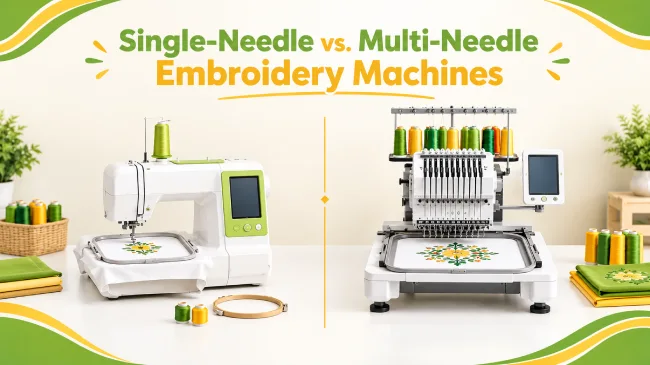
A single-needle machine uses one top thread at a time. You usually rethread it when the design calls for another color. A multi-needle machine can switch among loaded colors automatically.
That saves interruptions. It does not mean every needle sews at once: a single-head multi-needle machine normally stitches with one needle at a time.
Both types can produce detailed work. File quality, hooping, fabric support, needles and tension all matter. Read our guide to evaluating embroidery quality before blaming every fault on the machine.
Also separate needle count from bed type. Some single-needle machines have free arms. The Brother PR1X is one example. Access depends on the machine, hoop, garment opening and design placement.
A realistic time example
Assume a 10,000-stitch logo uses five color blocks with four changes. For illustration, both machines average 600 stitches per minute while actually stitching. Each manual change takes 45 seconds.
|
Task
|
Single needle
|
Multi-needle with colors loaded
|
|
Stitching
|
16.7 minutes
|
16.7 minutes
|
|
Manual rethreading
|
3 minutes
|
0 minutes
|
|
Shared hooping and finishing allowance
|
5 minutes
|
5 minutes
|
|
Illustrative total
|
24.7 minutes
|
21.7 minutes
|
This simplified example excludes initial threading, automatic change time, trims, bobbin work and faults. Actual elapsed time will differ. It isolates the manual rethreading burden rather than predicting either model’s speed.
Across 100 pieces, three saved minutes per item equals five hours. At a chosen labor value of $20 per hour, that is $100 of time value. It becomes cash savings only when you actually reduce paid labor; for an owner, it may instead free time for other work.
Best machine type for each home business
Products you sell | Sensible starting choice | What to test |
Personalized gifts | PE900 or NQ1700E | Largest name/design and access inside bags or baby items |
Monograms | Single needle for low volume; multi-needle for repeated batches | Small text, spacing and fabric stability |
Branded polos | Single needle for occasional jobs; PR680W or SAI for recurring batches | Knit stretch, registration and left-chest placement |
Structured caps | A machine with a proven compatible cap system | Center seam, usable height, frame clearance and driver cost |
Patches | Match field and workflow to batch size | Edge finishing, backing, cutting and attachment steps |
Larger garments | NQ1700E or 550E LE if the layout fits; larger equipment when it does not | Design dimensions and control of loose fabric |
For caps, direct embroidery and sewing on an embroidered patch are different products. Decide which you sell before choosing the equipment.
Total startup cost: budget beyond the machine

Use the following as a worked planning budget for a small single-needle setup. These are illustrative allowances, not supplier quotes or industry averages. Replace each line with local prices.
Item | Example allowance |
Machine | $1,200 |
Thread and bobbins | $150 |
Stabilizers and topping | $120 |
Needles, scissors and small tools | $60 |
Extra compatible hoop | $100 |
Blanks for samples and first orders | $200 |
Initial design files or digitizing | $100 |
Worktable, light and storage | $200 |
Maintenance reserve | $150 |
Subtotal | $2,280 |
Contingency, 15% of subtotal | $342 |
Example starting budget | $2,622 |
This assumes you already own a suitable computer. Add tax, freight, business setup, insurance, training, marketing and software where needed. A multi-needle setup also needs its own allowance for a stand, cap system and delivery or installation.
Ready-made files or outsourced digitizing can keep the initial software budget lower. Full digitizing software is useful when you need to create and edit stitch plans yourself; it is not essential just to load every purchased design. Compare your needs in our embroidery digitizing software guide.
Do not spend the whole budget on the machine. Leave enough for samples, failed blanks and the next order’s supplies.
Profitability and upgrade calculator

Use your own order data. A machine does not create demand, and a high selling price does not prove a high profit.
Calculate contribution per item
Contribution per item = selling price − all variable costs per item.
Include the blank, thread, backing, fees, packaging, expected waste, allocated digitizing and direct labor. Count design and customer-service time where it belongs. Spread one-time digitizing over a realistic batch, not an imagined future volume.
For example, suppose you sell an item for $28. Assume $14 in non-labor variable costs and 12 minutes of direct labor valued at $20 per hour:
$28 − $14 − $4 = $10 contribution per item.
If monthly fixed operating costs are $200, you need 20 items to cover them. This example excludes tax, finance costs and equipment depreciation.
Items sold per month | Contribution at $10 each | Less $200 fixed costs | Remaining before excluded costs |
20 | $200 | $200 | $0 |
50 | $500 | $200 | $300 |
100 | $1,000 | $200 | $800 |
200 | $2,000 | $200 | $1,800 |
Count hands-on labor and machine occupancy separately. If you must attend the machine for the whole run, include that paid time. If you can safely hoop another item during stitching, do not charge the same minute twice.
Estimate an upgrade’s payback
Simple payback months = net upgrade cost ÷ incremental monthly cash benefit.
Net upgrade cost includes the machine, accessories, delivery and training, less any trade-in proceeds. Monthly benefit includes genuine labor savings and contribution from extra orders you can actually sell, less added operating costs. Avoid counting the same saved time as both avoided labor and new production.
Here is a separate time-value scenario: a $7,000 net upgrade saves three operator minutes per piece, valued at $20 per hour. That equals $1 per piece. This is not a model-specific performance claim.
Monthly pieces | Time saved | Monthly time value | Cost divided by time value |
50 | 2.5 hours | $50 | 140 months |
100 | 5 hours | $100 | 70 months |
250 | 12.5 hours | $250 | 28 months |
500 | 25 hours | $500 | 14 months |
The final column is not cash payback unless the time value becomes cash savings. It also excludes extra running costs. If the net monthly cash benefit is zero or negative, there is no positive simple payback under those assumptions.
An upgrade can still make sense when it opens a proven product line or removes a real backlog. Test that case with firm orders and a measured sample run.
Buying checklist: what to confirm before paying
- Design fit: Bring your largest likely file. Check its exact stitch dimensions against the selected hoop.
- Garment access: Try the actual polo, tote, jacket or cap you plan to sell.
- Cap package: Confirm the frame, driver, hooping fixture, usable area and training included in the quote.
- Warranty: Ask which terms apply to business use, labor, electronics and shipping for repairs. Get them in writing.
- Local service: Find out who will repair the machine and how you would handle downtime.
- Parts and consumables: Check local access to needles, bobbins, hoops and common replacement parts.
- File compatibility: Test a file in the machine’s supported format. A JPG or PNG is not a ready-to-stitch file.
Learn how to convert an image to an embroidery file before loading designs into your machine. - Computer and software: Confirm operating-system support, transfer options and any paid app or software requirements.
- Training: Ask for lessons in hooping, tension, maintenance and thread-break recovery.
- Workspace: Measure the machine with its frame moving. Check stand capacity, access, power requirements and noise in your room.
- Full price: Compare complete packages, including delivery and essential accessories.
- Demonstration: Inspect the front and back of a sew-out made from your own file before committing.
FAQs


